
How to Process Animals in Hatch And Fry
Turn grown livestock into fresh meat before the grill ever lights.
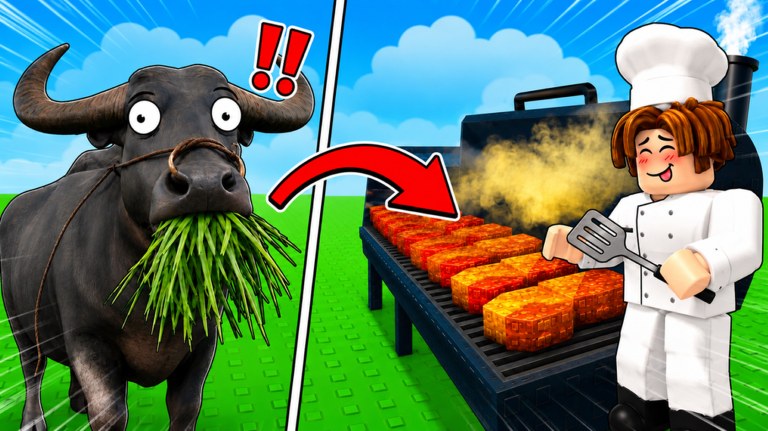
The official Hatch And Fry how-to-play line is blunt: hatch eggs, raise animals, process them into fresh meats, cook, serve, expand. How to hatch gets something into a pen. How to cook only works after this page. If you drop a live chicken on the iron because the hero thumbnail is funny, you are skipping the joint that actually creates a plate. Start on Getting Started if you have not finished the first-hour loop.
What “process” means on this plot
Processing is the farm-to-kitchen handoff. A grown animal sitting in a pen is inventory. Meat on the grill is a job. The Roblox gallery shows the gag twice: a cow chewing grass, then steaks on fire; a buffalo in the same pipeline. Official copy never pays you for a cute hatch. It pays when a customer eats a cooked meal. The processor is the station that turns the first picture into the second.
Walk this path every session:
- Confirm the animal is grown, not a fresh hatch still ticking in the nest.
- Interact with the processor / butcher / meat station on the farm half of the plot. Inputs: controls.
- Confirm meat actually appeared in the kitchen inventory or on the grill queue.
- Only then cook. Meals ranks what that meat becomes.
- Serve. How to serve is the badge clock, not this page.
If step 3 produces nothing, you did not process. Hop servers if the prompt is stuck. Do not buy a second egg as a superstition.
Where the station sits
On a typical Hatch And Fry plot the processor sits between the pens and the restaurant, not inside the dining room. Walk the farm half until you see a meat prompt, a hanging carcass gag, or a “process” button. If the prompt is grey, the animal is not ready, the station is locked behind cash, or you are standing on the wrong plot on a 4-player server. Redeem RELEASE before you spend starter cash on a second nest while this station is still locked.
Do not wait at the processor the way some tycoons make you wait at a craft bench. Queue the animal, confirm meat, then go load the grill or collect plates. Processing is a conversion, not a minigame.
Raise first, process second
The store page says animals grow and earn while you are offline. That sentence is why you fill pens before you quit. A hatch dumped on the processor at 10% growth is wasted. Let the meter finish. Offline growth is the intended catch-up — setup is on offline progress and the legal auto farm close-out. No executor required.
Rank what you process with the animal tier list:
- Chickens — process often. They exist to keep the grill from idling while cattle grow.
- Cattle / buffalo — process when grown. These are the steak and buffalo plates in official art.
- Dinosaur-scale hatches — process after the kitchen already turns. A rex statue in a pen does not skip Served 100.
An S-tier animal that never hits the processor is a C-tier meal. The meals list is explicit about that.
Why the grill stays empty
| Symptom | Likely cause | Fix |
|---|---|---|
| Grill idle, pens full | You hatched and never processed | Walk the processor, then cook |
| Processor prompt grey | Animal still growing, or station locked | Wait the growth meter; spend RELEASE on the station if it is a cash gate |
| Meat exists, no cash | You never cooked or served | Cook, then serve |
| Offline session, zero plates | Empty grill and unprocessed pens | Fill both before you leave |
| YouTube “fry the pet” clip | Wrong game or a joke thumbnail | Stay on this diner, not The Hatch |
Codes do not process animals. RELEASE is cash. Scripts that promise “auto butcher” for this place ID (124472567087489) are not confirmed — scripts hub.
Process on a 4-player server
Max players is 4. You will see other chefs. Your pens and your meat stay on your plot. Do not idle because someone else is posing with a carcass. If you grab the wrong prompt, hop. Voice chat is not supported. VIP servers are not enabled on the universe flags we read.
When Robux actually helps processing
Processing itself is not a listed gamepass. The store speeds cook, eat, collect, and cash:
- 2x Cookspeed (129) — after meat exists, if steaks sit raw.
- 2x Customer Eat Speed (119) — after plates exist, if diners camp seats.
- Auto Collect (79) — if cash sits on the floor while you process the next animal.
- 2x Cash (199) — if the whole loop already turns and you play daily.
Do not buy VIP (249) hoping it unlocks a secret butcher. Check the tooltip, then the planner and Is VIP worth it. Tip Jar (15) and Golden Jar (50) are not process tools.
After the meat exists
Go cook immediately. Offline cooking continues a queued grill, not a freezer full of uncooked livestock. Then serve so Served 10 / 100 / 500 / 1000 can move. Spend the cash on the next pen or processor upgrade, not on a rare egg while this station is starving.
When the Big Update ships a new station, walk the farm half once. A renamed processor still does this job: animal in, meat out, grill next. Until Lemon’s Projects prints cook seconds per cut, do not invent them. Process what official art already showed you — chicken, cattle, buffalo, then the rare nest — and keep the iron fed.
Frequently Asked Questions
Quick answers for Hatch And Fry players.
How do I process animals in Hatch And Fry?
Grow the animal in a pen, use the processor between the farm and the kitchen, confirm meat appeared, then cook. Details above.
Why is my grill empty if I have animals?
You have not processed them into meat. Hatch and raise are not the same as a plate. See the table above.
Do animals process while I am offline?
They grow offline. You still convert a grown animal at the processor, then queue the grill. Offline progress.
Is there an auto-process script?
No dedicated public script is confirmed for this place. Use the legal auto farm close-out, not an executor.